Isaac GR00T 1.7 on Jetson Thor
Deploy NVIDIA Isaac GR00T 1.7 Vision-Language-Action (VLA) model on NVIDIA Jetson AGX Thor with TensorRT mixed NVFP4 quantization.
 Aditya Sahu
  Anqi Liu
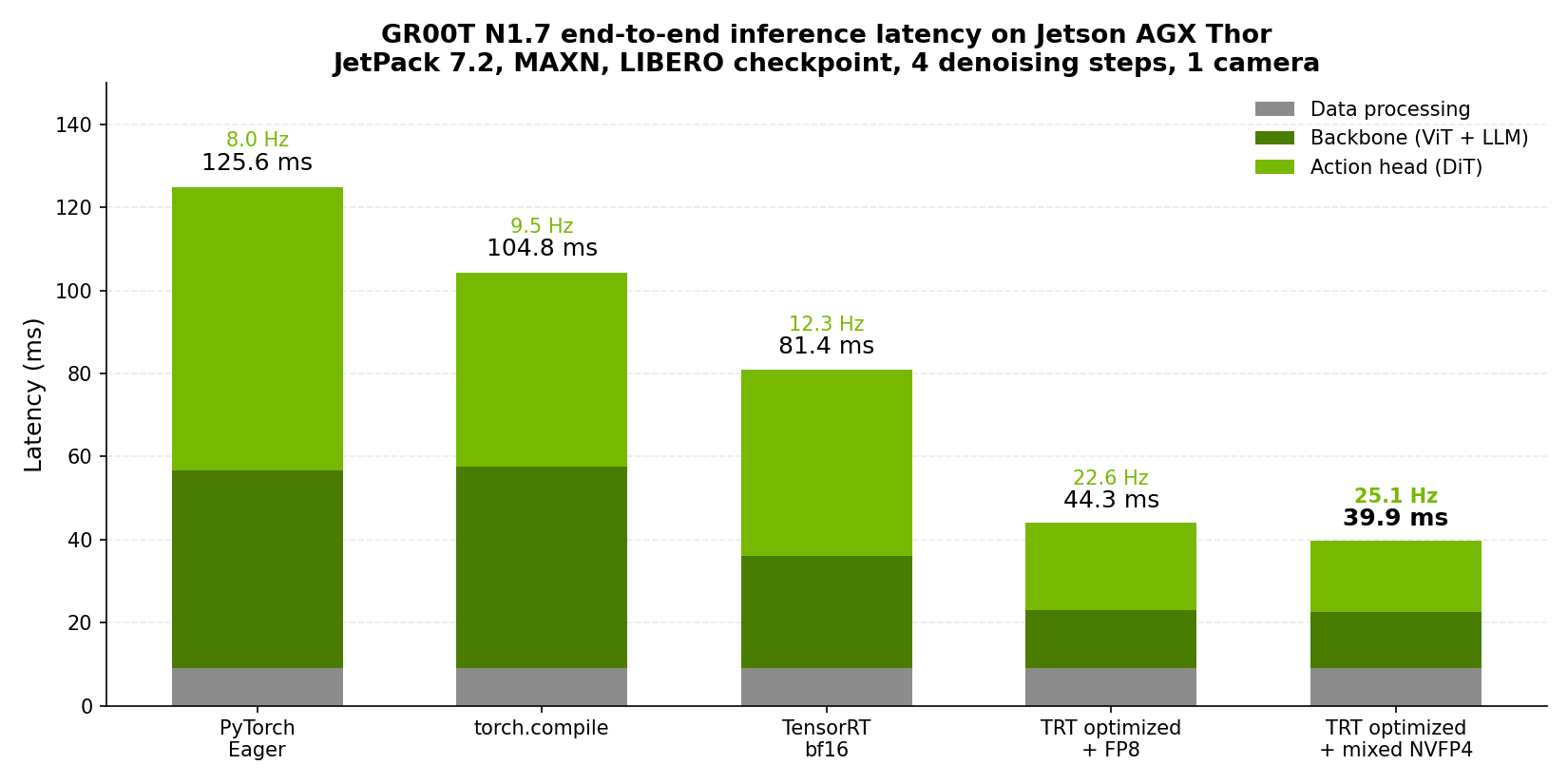
 Deploy NVIDIA’s Isaac GR00T 1.7 Vision-Language-Action (VLA) model on NVIDIA Jetson AGX Thor with TensorRT mixed NVFP4 quantization, taking end-to-end inference from 125 ms down to 39.9 ms, a 3.1x speedup at 25 Hz, with no measurable loss in task success.
What is Isaac GR00T 1.7?
Isaac GR00T is NVIDIA’s open foundation model for generalized humanoid robot reasoning and skills. GR00T 1.7 pairs a vision-language backbone with a diffusion-transformer action head: it takes camera images, robot proprioceptive state, and a natural-language instruction, and emits a chunk of robot actions through a short flow-matching denoising loop.
The same foundation model is post-trained onto different robot bodies, so the pipeline in this tutorial is not specific to any one embodiment:
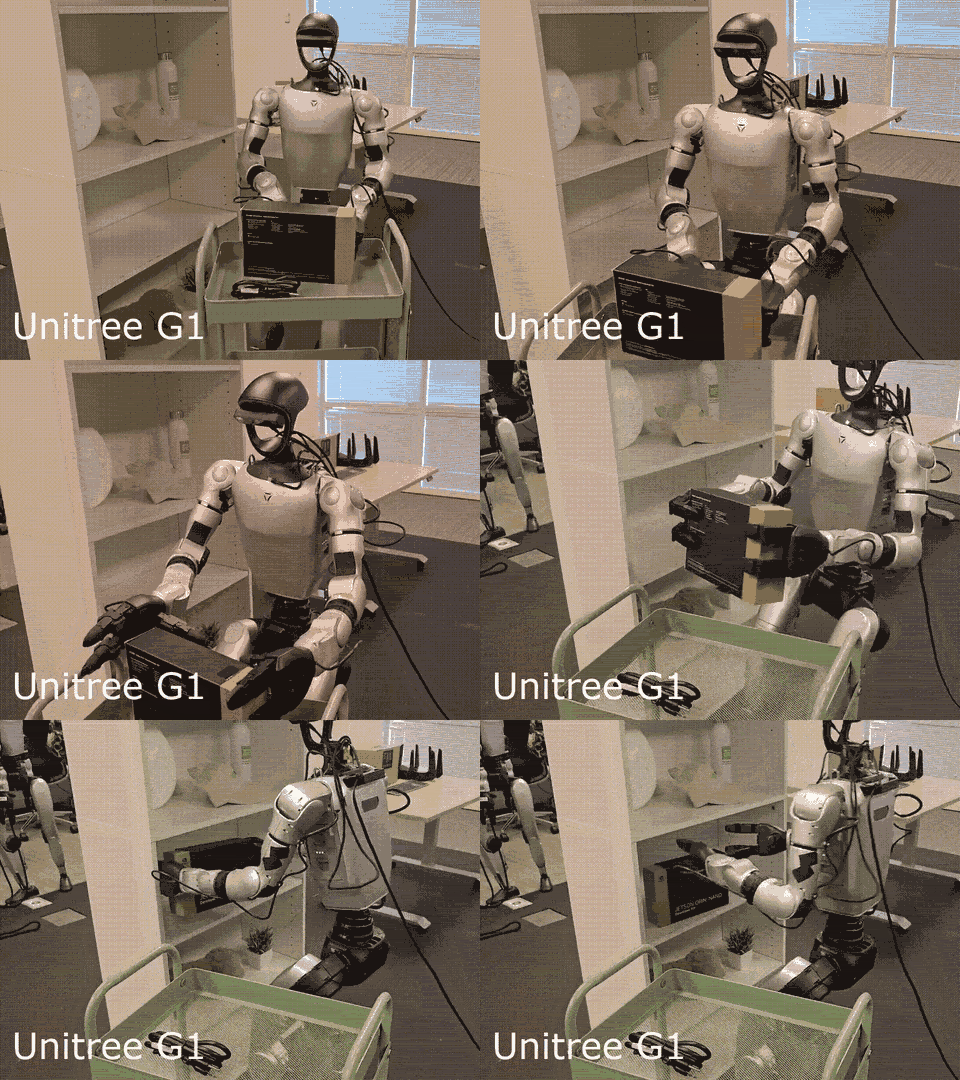
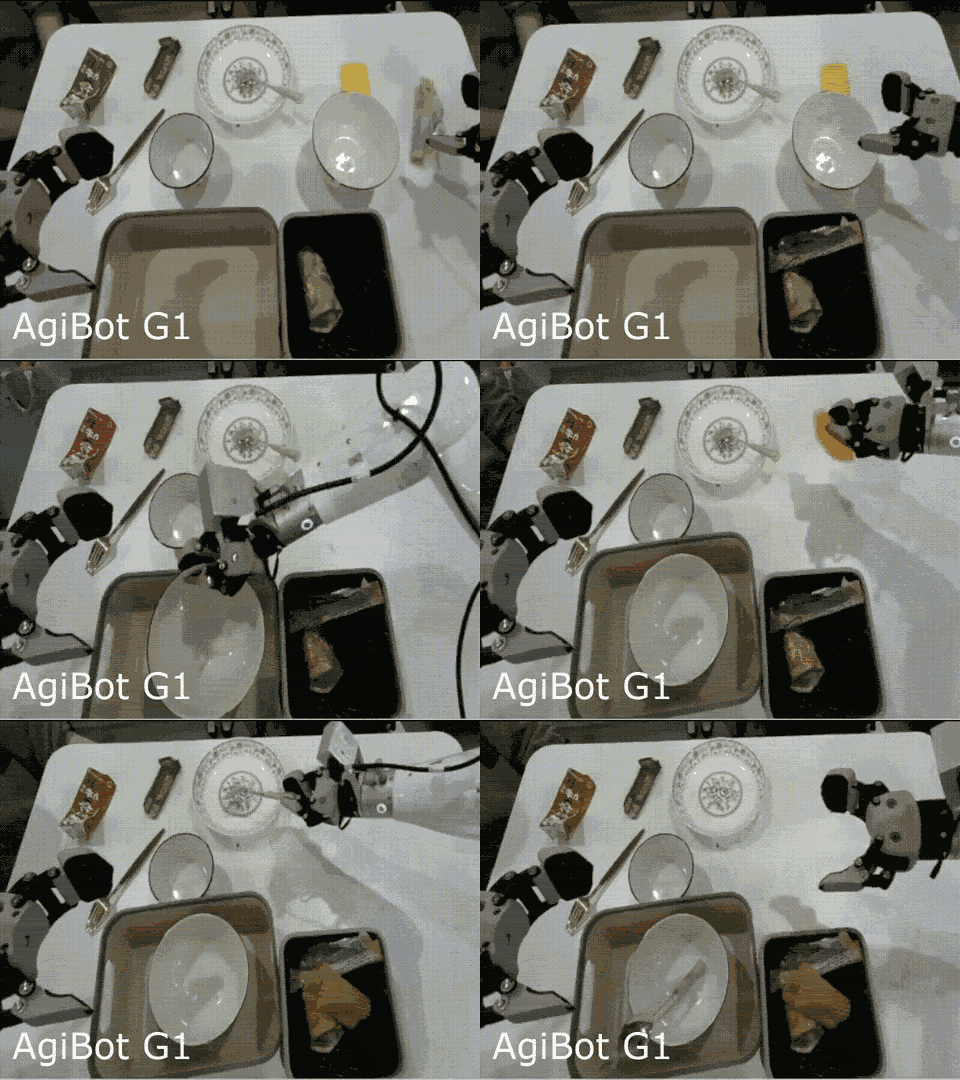
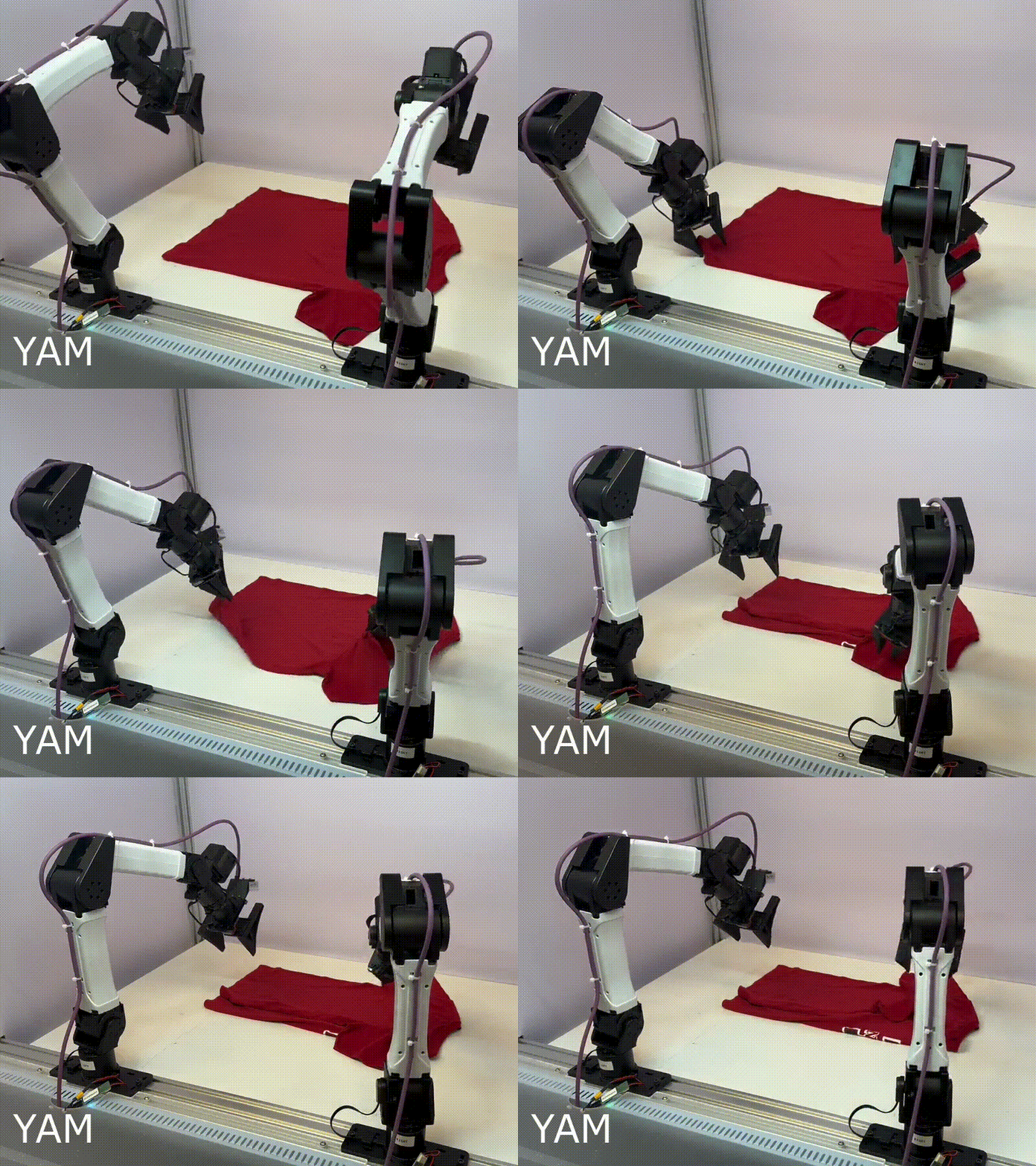
The backbone is nvidia/Cosmos-Reason2-2B, a Qwen3-VL architecture VLM (its config declares Qwen3VLForConditionalGeneration), loaded as a separate gated download rather than being bundled in the GR00T checkpoint, which is why Step 4 requires accepting its license. GR00T does not run all of it: the checkpoint sets select_layer: 16, and the loader physically pops text layers off the top until 16 remain, so 12 of Cosmos-Reason2-2B’s 28 text layers are discarded before inference.
The model is a two-stage pipeline, and the two stages have very different performance characteristics, which turns out to be the key to optimizing it:
| Stage | Components | Why it costs time |
|---|---|---|
| Backbone | Cosmos-Reason2-2B vision tower (24 blocks) + text model (16 of 28 layers) | Large weight matrices, memory-bandwidth bound |
| Action head | State/action encoders + AlternateVLDiT (32 layers) + action decoder | Runs once per denoising step (4x by default) |
Why Jetson AGX Thor?
VLA models fuse a vision encoder, a language model, and an action decoder into one pipeline that has to run at real-time control rates. Jetson AGX Thor brings Blackwell-class GPU compute with up to 128 GB of unified memory, so a 3B-parameter VLA fits entirely on-device with room for the TensorRT engines alongside it. Critically, Thor’s Blackwell GPU has native NVFP4 support, a 4-bit floating-point format with per-block scaling, which is what makes the aggressive quantization in this tutorial possible without the accuracy collapse you would get from 4-bit integer formats.
Pipeline Overview
Checkpoint ──► ONNX (per-component) ──► Calibrate (NVFP4/FP8) ──► TensorRT Engines ──► Inference| Stage | What happens |
|---|---|
| 1. Export | Each component (ViT, LLM, DiT, encoders) exported to ONNX separately |
| 2. Calibrate | ModelOpt inserts Q/DQ nodes using 10 samples of real robot data |
| 3. Build | TensorRT compiles one engine per component, plus a cross-attention K/V engine |
| 4. Verify | Cosine similarity of TRT output against the PyTorch reference |
| 5. Benchmark | Measures PyTorch eager, torch.compile, and TensorRT end to end |
A single script (build_trt_pipeline.py) runs all five stages.
Performance
Benchmarked on Jetson AGX Thor Developer Kit (JetPack 7.2, MAXN power mode), GR00T-N1.7-LIBERO/libero_10, 4 denoising steps, 1 camera, batch size 1. Latencies are medians over 20 iterations after 5 warmup iterations.
| Inference Backend | Backbone | Action Head | E2E Latency | Frequency | Speedup |
|---|---|---|---|---|---|
| PyTorch Eager | 47.7 ms | 68.2 ms | ~126 ms | 8.0 Hz | 1.00x |
torch.compile | 48.6 ms | 46.8 ms | ~105 ms | 9.5 Hz | 1.20x |
| TensorRT bf16 (full pipeline) | 27.0 ms | 45.0 ms | ~81 ms | 12.3 Hz | 1.54x |
| TensorRT optimized + FP8 | 14.1 ms | 21.1 ms | ~44 ms | 22.6 Hz | 2.84x |
| TensorRT optimized + mixed NVFP4 | 13.6 ms | 17.2 ms | ~40 ms | 25.1 Hz | 3.10x |
Accuracy holds across all three TensorRT configurations, and it holds where it matters most: closed-loop task success is on par with the PyTorch baseline.
Note: these numbers are measured on JetPack 7.2, which is roughly 13% faster than JetPack 7.1 across every unoptimized configuration, so the speedup over the bf16 TensorRT baseline is 2.04x here rather than the 2.41x quoted against a JetPack 7.1 baseline.
How the Optimization Works
Two independent mechanisms combine to produce the end-to-end latency under 40 ms. Understanding which one targets which stage explains why you need both.
1. Per-component quantization
Precision is chosen per component rather than uniformly, because the vision tower and the language model tolerate quantization very differently:
| Policy | ViT | LLM | DiT | Aux |
|---|---|---|---|---|
baseline (none) | fp32 | bf16 | bf16 | bf16 |
fp8 | fp8 | fp8 | fp8 | fp16 |
mixed_nvfp4 | fp8 | nvfp4 | nvfp4 | fp16 |
Even under the NVFP4 policy, accuracy-sensitive layers stay at higher precision: the LLM o_proj and down_proj, and the DiT attention, remain FP8. FP8 and NVFP4 are both Q/DQ recipes layered over an FP16 graph, so the TensorRT network boundary stays FP16 in either case. This is what shrinks the backbone from 27 ms to 13.6 ms.
2. Optimized execution profile
This is a graph-restructuring pass, independent of precision, and it is where the action head goes from 45 ms to 17.2 ms:
- Cross-attention K/V hoisting. The DiT’s cross-attention keys and values depend only on the vision-language context, not on the denoising timestep. They are computed once and reused across all 4 denoising steps instead of being recomputed each step. This produces the extra
dit_cross_kv_*.engineartifact you will see in the output directory. - Offline timestep precomputation. Because the 4 denoising timesteps are fixed and known ahead of time, everything derived from them (AdaLN modulations, output modulations, action time embeddings) is computed at export time and saved to
action_head_constants.pt. At runtime these are simply indexed. - Linear-layer fusion. Projections that share an input are concatenated into a single larger GEMM, reducing kernel launches.
- CUDA graph capture of the whole action head, which is why the benchmark prints
Action Head: TRT CUDA graph.
Which engines get built (click to expand)
| Engine | Component | Precision under mixed_nvfp4 |
|---|---|---|
vit_fp8.engine | Qwen3-VL vision tower, 24 blocks | FP8 |
llm_nvfp4.engine | Qwen3-VL text model, 16 layers | NVFP4 (FP8 for o_proj/down_proj) |
vl_self_attention.engine | SelfAttentionTransformer, 4 layers | FP16 |
state_encoder.engine | CategorySpecificMLP | FP16 |
action_encoder.engine | MultiEmbodimentActionEncoder | FP16 |
dit_nvfp4.engine | AlternateVLDiT, 32 layers | NVFP4 (FP8 attention) |
dit_cross_kv_nvfp4.engine | Hoisted cross-attention K/V | NVFP4 |
action_decoder.engine | CategorySpecificMLP | FP16 |
Lightweight operations stay in PyTorch: embed_tokens, masked_scatter, get_rope_index, and VLLN.
Prerequisites
Hardware
- NVIDIA Jetson AGX Thor Developer Kit
- NVMe SSD strongly recommended. Budget ~60 GB free (26 GB container, ~13 GB per engine build, ~7 GB assets)
Software
| Component | Required Version |
|---|---|
| JetPack | 7.2 (L4T R39.x) |
| CUDA | 13.0+ |
| Docker | 28.x+ |
| NVIDIA Container Toolkit | 1.18+ |
| Git LFS | any recent |
Check your setup:
cat /etc/nv_tegra_release   # Should show R39
nvidia-smi                  # Should show CUDA 13.x, NVIDIA Thor
docker --version            # Docker 28.x or newer
git lfs version             # Must be present before cloning (see Step 2)
Hugging Face access
Every GR00T checkpoint loads the gated backbone nvidia/Cosmos-Reason2-2B. Accept its license at huggingface.co/nvidia/Cosmos-Reason2-2B before you start. Gating is automatic, so approval is immediate.
Step 1: Set Jetson to Maximum Performance
Boost all clocks for consistent benchmark results.
# Set maximum performance power mode
sudo nvpmodel -m 0

# Lock all clocks to maximum frequency
sudo jetson_clocks
Verify with:
sudo jetson_clocks --showStep 2: Install Git LFS (before cloning)
The Isaac-GR00T repository stores the Thor torchcodec wheel and the demo dataset parquet files as Git LFS objects, so install git-lfs before you clone.
Install it with apt:
sudo apt-get update && sudo apt-get install -y git-lfs
git lfs install
Step 3: Clone the Repository and Add the Optimization Patch
3.1 Clone Isaac-GR00T
git clone https://github.com/NVIDIA/Isaac-GR00T.git
cd Isaac-GR00T
git checkout 9c7e746b2cd37a810070a98ef41d290a07e806c2
git lfs pull
Confirm LFS content actually arrived. This should report a Zip archive, not ASCII text:
file scripts/deployment/thor/wheels/torchcodec-*.whlNote: Pinned to commit
9c7e746(2026-07-08).
3.2 Add the TensorRT Optimization Patch
Upstream Isaac-GR00T at this commit includes the bf16 TensorRT pipeline but not the quantization and execution optimizations. From the root of the checkout (Isaac-GR00T/), run the helper script to add them:
wget -qO- https://www.jetson-ai-lab.com/code-samples/groot_n17_on_thor/download.sh | bashThis applies a patch touching only scripts/deployment/ plus one test file (13 files, +2720/−217 lines), adding four new modules:
n1d7_optimization_config.py: precision policy, the single source of truth shared by export, build, and runtimecalibration.py: per-layer quantization recipes and the calibration loopn1d7_optimized_export.py: builds and exports the restructured action-head graphn1d7_optimized_runtime.py: executes the restructured inference loop
and extending export_onnx_n1d7.py, build_tensorrt_engine.py, build_trt_pipeline.py, trt_model_forward.py, benchmark_inference.py, and standalone_inference_script.py.
Step 4: Authenticate with Hugging Face
hf auth login --force
hf auth whoami   # must print your username
Step 5: Download the Checkpoint and Calibration Dataset
# Model checkpoint (~6.5 GB)
hf download nvidia/GR00T-N1.7-LIBERO \
  libero_10/config.json libero_10/embodiment_id.json \
  libero_10/model-00001-of-00002.safetensors \
  libero_10/model-00002-of-00002.safetensors \
  libero_10/model.safetensors.index.json \
  libero_10/processor_config.json libero_10/statistics.json \
  libero_10/experiment_cfg/conf.yaml \
  libero_10/experiment_cfg/config.yaml \
  libero_10/experiment_cfg/dataset_statistics.json \
  --local-dir checkpoints/GR00T-N1.7-LIBERO

# Calibration dataset for quantization (~614 MB)
hf download --repo-type dataset IPEC-COMMUNITY/libero_10_no_noops_1.0.0_lerobot \
  --local-dir examples/LIBERO/libero_10_no_noops_1.0.0_lerobot/

# GR00T needs its modality descriptor inside the LeRobot dataset
cp examples/LIBERO/modality.json examples/LIBERO/libero_10_no_noops_1.0.0_lerobot/meta/
Tip: Other fine-tunes work identically. Swap in
libero_goal,libero_object, orlibero_spatial, or your own finetuned checkpoint. The pipeline is the same for base and finetuned models.
Step 6: Build the Docker Image for Jetson Thor
cd docker && bash build.sh --profile=thor && cd ..Note: The first build takes 10–15 minutes, plus time to pull the ~10 GB CUDA 13 base image. Subsequent builds use Docker cache.
What the Dockerfile does (click to expand)
- Base image:
nvidia/cuda:13.0.0-devel-ubuntu24.04 - Pip index: Jetson AI Lab
sbsa/cu130, precompiled aarch64 CUDA 13 wheels - Venv:
/opt/gr00t-venv, activated by default viaENV PATH - Installs: NVPL LAPACK/BLAS (required by the Jetson torch wheel), CUDA dev packages (
nvcc,cudart-dev,nvrtc-dev),uv, the Thorpyproject.tomldependency set, GR00T in editable mode, and the bundledtorchcodecwheel - Ships: PyTorch 2.10.0, TensorRT 10.15.1.29
Verify the runtime stack:
docker run --rm --runtime nvidia --gpus all gr00t-thor python -c "
import torch, tensorrt as trt
print('torch     ', torch.__version__)
print('TensorRT  ', trt.__version__)
print('device    ', torch.cuda.get_device_name(0))
print('capability', torch.cuda.get_device_capability(0))"
Expected: torch 2.10.0, TensorRT 10.15.1.29, NVIDIA Thor, capability (11, 0).
Step 7: Launch the Docker Container
docker run -it --rm --runtime nvidia --gpus all \
  --ipc=host --ulimit memlock=-1 --ulimit stack=67108864 \
  --network host \
  -v "$PWD":/workspace/repo \
  -v "$HOME/.cache/huggingface":/root/.cache/huggingface \
  -w /workspace/repo \
  -e PYTHONPATH=/workspace/repo \
  -e PATH=/root/.local/bin:/opt/gr00t-venv/bin:/usr/local/cuda/bin:/usr/local/sbin:/usr/local/bin:/usr/sbin:/usr/bin:/sbin:/bin \
  gr00t-thor bash
You are now inside the container. All remaining steps run in this shell.
Step 8: (Optional) Build the Baseline bf16 Engines
Useful as a reference point on your own hardware, and a good way to confirm the pipeline works before adding quantization.
python scripts/deployment/build_trt_pipeline.py \
  --model-path checkpoints/GR00T-N1.7-LIBERO/libero_10 \
  --dataset-path demo_data/libero_demo \
  --embodiment-tag LIBERO_PANDA \
  --output-dir ./gr00t_trt_baseline
This runs export → build → verify → benchmark in about 10–15 minutes and should land near 81 ms E2E with a final-action cosine similarity of 0.9999.
Step 9: Build the Optimized NVFP4 Engines
This is the step that produces the 39.9 ms result.
9.1 Install ModelOpt
uv pip install "nvidia-modelopt[onnx]==0.39.0"
python -c "import modelopt; print('modelopt', modelopt.__version__)"
9.2 Generate dataset normalization statistics
The calibration data pipeline needs meta/stats.json, which this writes:
python gr00t/data/stats.py \
  --dataset-path examples/LIBERO/libero_10_no_noops_1.0.0_lerobot \
  --embodiment-tag LIBERO_PANDA
9.3 Export, calibrate, build, verify, and benchmark
python scripts/deployment/build_trt_pipeline.py \
  --model-path checkpoints/GR00T-N1.7-LIBERO/libero_10 \
  --dataset-path demo_data/libero_demo \
  --embodiment-tag LIBERO_PANDA \
  --output-dir ./gr00t_trt_optimized_mixed_nvfp4 \
  --execution-profile optimized \
  --quantization mixed_nvfp4 \
  --calib-dataset-path examples/LIBERO/libero_10_no_noops_1.0.0_lerobot \
  --calib-size 10
The three flags that matter are --execution-profile optimized, --quantization mixed_nvfp4, and the --calib-* pair. Drop them and you get the Step 8 baseline.
Expected output (~10–15 minutes):
Quantization: mixed_nvfp4
  vit=fp8, llm=nvfp4, dit=nvfp4, aux=fp16
  Calibration: dataset=examples/LIBERO/libero_10_no_noops_1.0.0_lerobot, samples=10

[6b] Final action output comparison:
  Cosine Similarity: 0.999743
  L1 Mean Error:     0.009774
  PASS — TRT matches PyTorch

Benchmarking TensorRT (n17_full_pipeline)...
  ViT: TRT | LLM: TRT | Action Head: TRT CUDA graph
  E2E:             median=39.9 ms, mean=41.0 ± 1.8 ms (25.1 Hz)
  Backbone:        13.56 ms (median)
  Action Head:     17.18 ms (median)
Other quantization policies (click to expand)
| Flags | Precision | E2E | Cosine | Notes |
|---|---|---|---|---|
| (none) | bf16 | ~81 ms | 0.999972 | Baseline, no ModelOpt or calibration needed |
--execution-profile optimized --quantization fp8 | FP8 | ~44 ms | 0.999876 | Slightly more accurate, slightly slower |
--execution-profile optimized --quantization mixed_nvfp4 | FP8 + NVFP4 | ~40 ms | 0.999743 | Fastest |
Note:
--batch-sizeis baked as a static dimension into both the ONNX and TensorRT models. Engines built at one batch size cannot be reused at another; re-run the export and build steps to change it. Engines are also GPU-architecture-specific and must be rebuilt for a different device.
Step 10: (Optional) Verify Action Accuracy on Real Trajectories
Cosine similarity compares single forward passes. This runs whole trajectories through both backends and compares predicted actions against dataset ground truth, and doubles as the reference for integrating TensorRT inference into your own code.
Commands, expected output, and plots (click to expand)
# PyTorch reference
python scripts/deployment/standalone_inference_script.py \
  --model-path checkpoints/GR00T-N1.7-LIBERO/libero_10 \
  --dataset-path demo_data/libero_demo \
  --embodiment-tag LIBERO_PANDA \
  --traj-ids 0 1 2 3 4 --inference-mode pytorch --execution-horizon 8 \
  --save-plot-path ./output/pytorch_inference.png

# Optimized TensorRT engines
python scripts/deployment/standalone_inference_script.py \
  --model-path checkpoints/GR00T-N1.7-LIBERO/libero_10 \
  --dataset-path demo_data/libero_demo \
  --embodiment-tag LIBERO_PANDA \
  --traj-ids 0 1 2 3 4 --inference-mode trt_full_pipeline --execution-horizon 8 \
  --trt-engine-path ./gr00t_trt_optimized_mixed_nvfp4/engines \
  --save-plot-path ./output/trt_nvfp4_inference.png
Expected: error is essentially unchanged while per-step inference drops ~4.7x:
| Mode | Avg MSE | Avg MAE | Inference / step |
|---|---|---|---|
| PyTorch | 0.001390 | 0.013069 | 214.2 ms |
| TRT optimized + mixed NVFP4 | 0.001458 | 0.015795 | 45.4 ms |
Each run also writes a plot of predicted against recorded actions, one panel per action dimension. --save-plot-path is rewritten once per trajectory, so the file left on disk is the last of --traj-ids 0 1 2 3 4. The PyTorch and NVFP4 plots are visually indistinguishable, which is the point: quantizing to NVFP4 did not change the trajectory the policy produces.
Note: the optimized runtime captures a CUDA graph over the action-head engines, and that graph must be destroyed before the TensorRT execution contexts it references. Left to interpreter shutdown, which frees module globals in an arbitrary order, the C++ destructors intermittently hang or segfault after the results have already printed. The patch therefore releases the engines explicitly at the end of
main(), the same waybenchmark_inference.pyandverify_n1d7_trt.pyalready did, so this script now exits cleanly with status 0. If you are running an older copy of the patch and see a hang or aSegmentation fault (core dumped)afterDone, your results and plots are complete, so pressCtrl+Cor wrap the call intimeout.
Deploying in Your Own Code
scripts/deployment/standalone_inference_script.py is the reference implementation: it shows how to load the engines, bind inputs, and run the denoising loop against a real observation stream. The engine-loading and forward logic live in trt_model_forward.py and n1d7_optimized_runtime.py; the optimized runtime is selected automatically from export_metadata.json in the engines directory.
Note: the bundled policy server (
gr00t/eval/run_gr00t_server.py) does not currently accept a TensorRT engine path; it serves the PyTorch model only. To serve the optimized engines over a network, wrap the runtime fromstandalone_inference_script.pyin your own server process.
Troubleshooting
| Issue | Solution |
|---|---|
Failed to read from zip file / unable to locate the end of central directory record during Docker build | The torchcodec wheel is a Git LFS pointer. Install git-lfs (Step 2), then git lfs pull and rebuild. |
uv: command not found, or No module named 'modelopt' several minutes into Step 9 | PATH does not include /root/.local/bin. Relaunch the container with the explicit PATH from Step 7, then re-run 9.1. |
Cannot download the VLM backbone 'nvidia/Cosmos-Reason2-2B', which is a gated Hugging Face repo, or Model 'nvidia/...' not found for a public repo | Accept the license, then hf auth login --force. An expired token returns 401, which the CLI reports as “not found”. Verify with hf auth whoami. |