Tutorial - NanoOWL
Run NanoOWL, OWL-ViT optimized to run real-time on Jetson with NVIDIA TensorRT for open-vocabulary object detection.
 Chitoku YATO
 Let’s run NanoOWL, OWL-ViT optimized to run real-time on Jetson with NVIDIA TensorRT.

📋 Prerequisites
Supported Devices
- Jetson AGX Orin (64GB)
- Jetson AGX Orin (32GB)
- Jetson Orin NX (16GB)
- Jetson Orin Nano (8GB)
JetPack Version
- JetPack 5 (L4T r35.x)
- JetPack 6 (L4T r36.x)
Storage
NVMe SSD highly recommended for storage speed and space:
7.2 GBfor container image- Space for models
Setup jetson-containers
Clone and setup jetson-containers:
git clone https://github.com/dusty-nv/jetson-containers
bash jetson-containers/install.sh
🚀 How to Start
Use the jetson-containers run and autotag commands to automatically pull or build a compatible container image.
jetson-containers run --workdir /opt/nanoowl $(autotag nanoowl)📷 How to Run the Tree Prediction (Live Camera) Example
Step 0: Ensure you have a camera device connected
ls /dev/video*If no video device is found, exit from the container and check if you can see a video device on the host side.
Step 1: Install missing module
pip install aiohttpStep 2: Launch the demo
cd examples/tree_demo
python3 tree_demo.py --camera 0 --resolution 640x480 \
../../data/owl_image_encoder_patch32.engine| Option | Description | Example |
|---|---|---|
--camera | To specify camera index (corresponds to /dev/video*) when multiple cameras are connected | 1 |
--resolution | To specify the camera open resolution in the format {width}x{height} | 640x480 |
Note: If it fails to find or load the TensorRT engine file, build the TensorRT engine for the OWL-ViT vision encoder on your Jetson device:
python3 -m nanoowl.build_image_encoder_engine \
    data/owl_image_encoder_patch32.engine
Step 3: Open your browser
Open your browser to http://<ip address>:7860
Step 4: Try different prompts
Type whatever prompt you like to see what works!
Here are some examples:
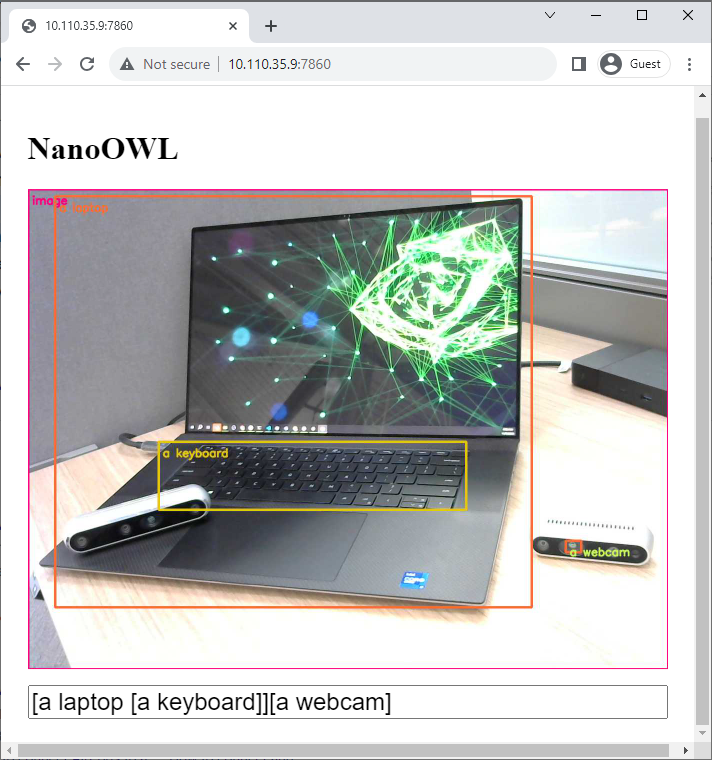
[a face [a nose, an eye, a mouth]][a face (interested, yawning / bored)](indoors, outdoors)
🎉 Result
🔗 Next Steps
- Supported Models - Check out models optimized for Jetson
- Introduction to GenAI - Learn about running LLMs and VLMs on Jetson