Ollama on Jetson
Learn how to install and run Ollama on your Jetson device for easy local LLM deployment. Covers native installation, Docker containers, and Open WebUI setup.
 Dustin Franklin
 Ollama is a popular open-source tool that allows users to easily run large language models (LLMs) locally on their own computer, serving as an accessible entry point to LLMs for many.
It now offers out-of-the-box support for the Jetson platform with CUDA support, enabling Jetson users to seamlessly install Ollama with a single command and start using it immediately.
In this tutorial, we introduce two installation methods: (1) the default native installation using the official Ollama installer, and (2) the Docker container method, which allows users to avoid making changes to their existing system.

- The
ollamaclient can run inside or outside container after starting the server. - You can also run an Open WebUI server for supporting web clients.
- Supports the latest models like gpt-oss!
Prerequisites
Supported Devices:
- Jetson AGX Thor
- Jetson AGX Orin (64GB)
- Jetson AGX Orin (32GB)
- Jetson Orin NX (16GB)
- Jetson Orin Nano (8GB)
JetPack Version:
- JetPack 5 (L4T r35.x)
- JetPack 6 (L4T r36.x)
Storage: NVMe SSD highly recommended for storage speed and space
7GBforollamacontainer image- Space for models (
>5GB)
(1) Native Install
Ollama’s official installer supports Jetson and can easily install CUDA-supporting Ollama.
curl -fsSL https://ollama.com/install.sh | shIt creates a service to run ollama serve on startup, so you can start using the ollama command right away.
Example: Ollama usage
ollamaExample: Run a model on CLI
ollama run gpt-oss:20bMemory considerations: If your Jetson doesn’t have enough memory to run larger models, try running smaller models. You can find the full list of models supported by Ollama at https://ollama.com/library.
(2) Docker Container for Ollama
For Jetson Thor (JetPack 7)
First, pull the container image:
docker pull ghcr.io/nvidia-ai-iot/ollama:r38.2.arm64-sbsa-cu130-24.04Then run the Ollama server:
docker run --runtime nvidia -it --rm --network host ghcr.io/nvidia-ai-iot/ollama:r38.2.arm64-sbsa-cu130-24.04For Jetson Orin (JetPack 6)
First, pull the container image:
docker pull dustynv/ollama:r36.2.0Then run the Ollama server:
# Option 1: models cached under jetson-containers/data
jetson-containers run --name ollama $(autotag ollama)

# Option 2: models cached under your user's home directory
docker run --runtime nvidia -it --rm --network host -v ~/ollama:/ollama -e OLLAMA_MODELS=/ollama dustynv/ollama:r36.2.0
Once in the container, you will see something like this:
Starting ollama server


OLLAMA_HOST   0.0.0.0
OLLAMA_LOGS   /data/logs/ollama.log
OLLAMA_MODELS /data/models/ollama/models


ollama server is now started, and you can run commands here like 'ollama run gemma3'

root@2a79cc8835d9:/#
Try running a GPT OSS (20b parameter) model by issuing the command below:
ollama run --verbose gpt-oss:20bIt will download 14GB weight, so it takes some time here as well.
Once ready, it will show something like this:
root@2a79cc8835d9:/# ollama run --verbose gpt-oss:20b
pulling manifest
pulling b112e727c6f1: 100% ▕███████████████████████████████████████████▏  13 GB
pulling fa6710a93d78: 100% ▕███████████████████████████████████████████▏ 7.2 KB
pulling f60356777647: 100% ▕███████████████████████████████████████████▏  11 KB
pulling d8ba2f9a17b3: 100% ▕███████████████████████████████████████████▏   18 B
pulling 55c108d8e936: 100% ▕███████████████████████████████████████████▏  489 B
verifying sha256 digest
writing manifest
success
>>> Send a message (/? for help)
Try any prompt and you will get something like this:
root@c11344f6bbbc:/# ollama run --verbose gpt-oss:20b
>>> why is the sky blue in one sentence
Thinking...
We need to answer: "why is the sky blue in one sentence". Just one sentence. Provide explanation: Rayleigh scattering of sunlight,
shorter wavelengths scatter more. We'll produce a single sentence. Let's give a concise explanation.
...done thinking.

The sky looks blue because the Earth's atmosphere scatters shorter-wavelength (blue) light from the sun more efficiently than longer
wavelengths, a phenomenon called Rayleigh scattering.

total duration:       3.504445244s
load duration:        225.399151ms
prompt eval count:    76 token(s)
prompt eval duration: 673.487645ms
prompt eval rate:     112.85 tokens/s
eval count:           88 token(s)
eval duration:        2.603822053s
eval rate:            33.80 tokens/s
>>> Send a message (/? for help)
You can finish the session by typing /bye.
Memory considerations: If your Jetson doesn’t have enough memory to run larger models like
gpt-oss:20b, try running smaller models. You can find the full list of models supported by Ollama at https://ollama.com/library.
Open WebUI
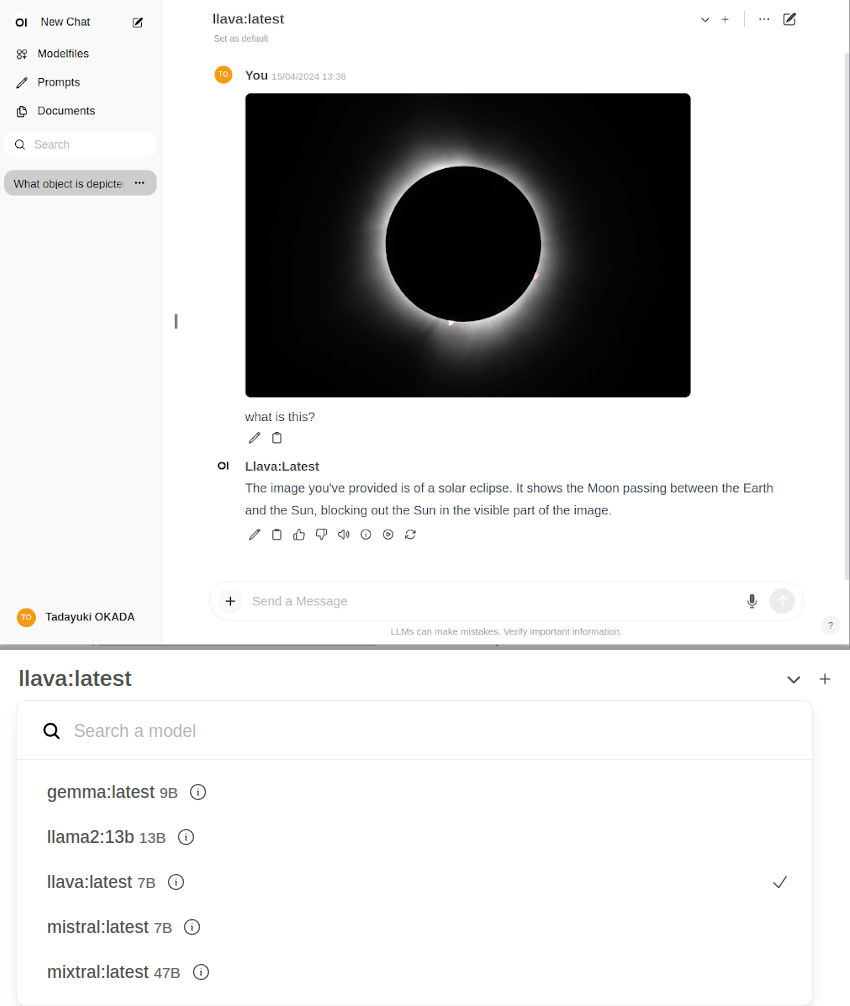
To run an Open WebUI server for client browsers to connect to, use the open-webui container:
docker run -d --network=host -v open-webui:/app/backend/data -e OLLAMA_BASE_URL=http://127.0.0.1:11434 --name open-webui --restart always ghcr.io/open-webui/open-webui:mainYou can then navigate your browser to http://JETSON_IP:8080, and create a fake account to login (these credentials are only local).
Ollama uses llama.cpp for inference. It gets roughly half of peak performance versus faster APIs like NanoLLM, but is generally considered fast enough for text chat.
Next Steps
- Check out Supported Models for a list of models optimized for Jetson
- Try vLLM for production-grade serving with higher throughput