Speculative Decoding on Jetson: MTP, DFlash, and DSpark
Learn how speculative decoding speeds up local LLM generation on Jetson, what the different techniques are, and how to use them with vLLM and llama.cpp.
This tutorial introduces speculative decoding, explores three of the most capable techniques available today, and shares practical guidance for configuring and tuning them effectively.
Speculative decoding is a lossless way to accelerate the decode phase of LLM inference. Decode is the part that generates the response one token at a time. At the low batch sizes common on edge devices, it is usually bottlenecked by memory bandwidth because the system must repeatedly read the target model’s weights to produce each new token.
Speculative decoding changes that. A lightweight proposer drafts several candidate tokens, then the target model verifies them together in one pass. The target model still makes the final decision at every position, so speculative decoding does not reduce output quality. Under deterministic decoding, it produces the same answer the target model would have produced without speculation. When sampling is enabled, it preserves the target model’s output distribution.
The extra memory is usually modest because the proposer is much smaller than the target model. MTP can require almost no additional model memory when its prediction heads are already included in the checkpoint. This makes speculative decoding an unusually good trade on Jetson. It gives you raw decode performance without trading away answer quality, so leaving it disabled can mean leaving a large amount of performance on the table.
On Jetson AGX Thor, using MTP with a speculative depth of 3 increased Qwen3.8 27B decode throughput from roughly 13 tokens/s to 35 tokens/s in our testing. Later in this tutorial, we show the exact configuration and explain how to tune the same setting for your workload.
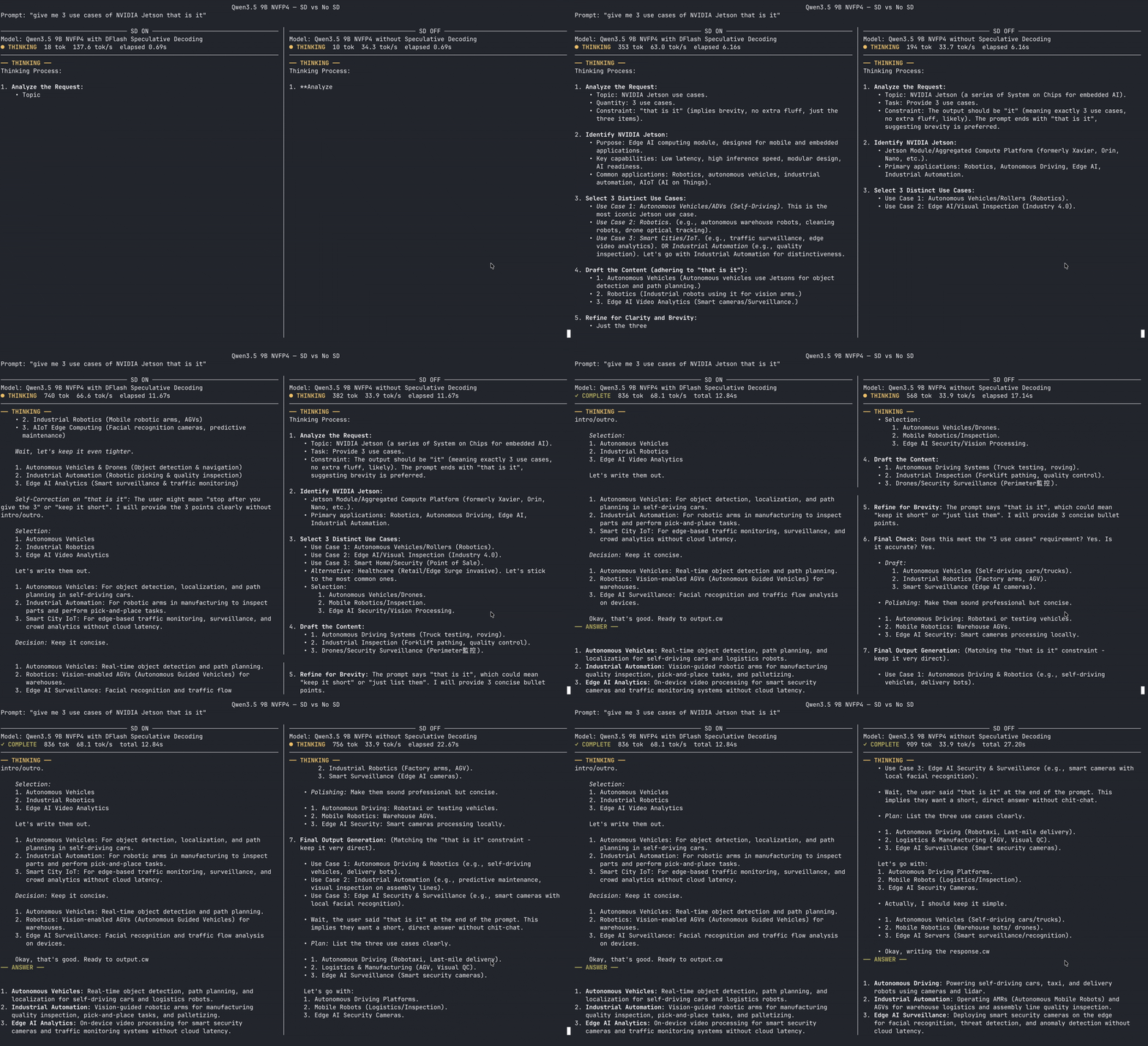
The following side-by-side example runs the same prompt with the same Qwen3.5 9B NVFP4 target. DFlash speculative decoding is enabled on the left and disabled on the right. At the same elapsed time, the speculative run has generated more tokens and advanced further through the response.
This tutorial covers:
- what speculative decoding is and why it matters at the edge
- what the different speculative decoding techniques are and how to use them
- how to find checkpoints for a specific model variant
- how to enable speculative decoding in vLLM and llama.cpp
- how to benchmark different speculative depths on your own workload
How speculative decoding works
Normal autoregressive decoding produces one token per target model pass. Speculative decoding changes the amount of useful work completed by that pass:
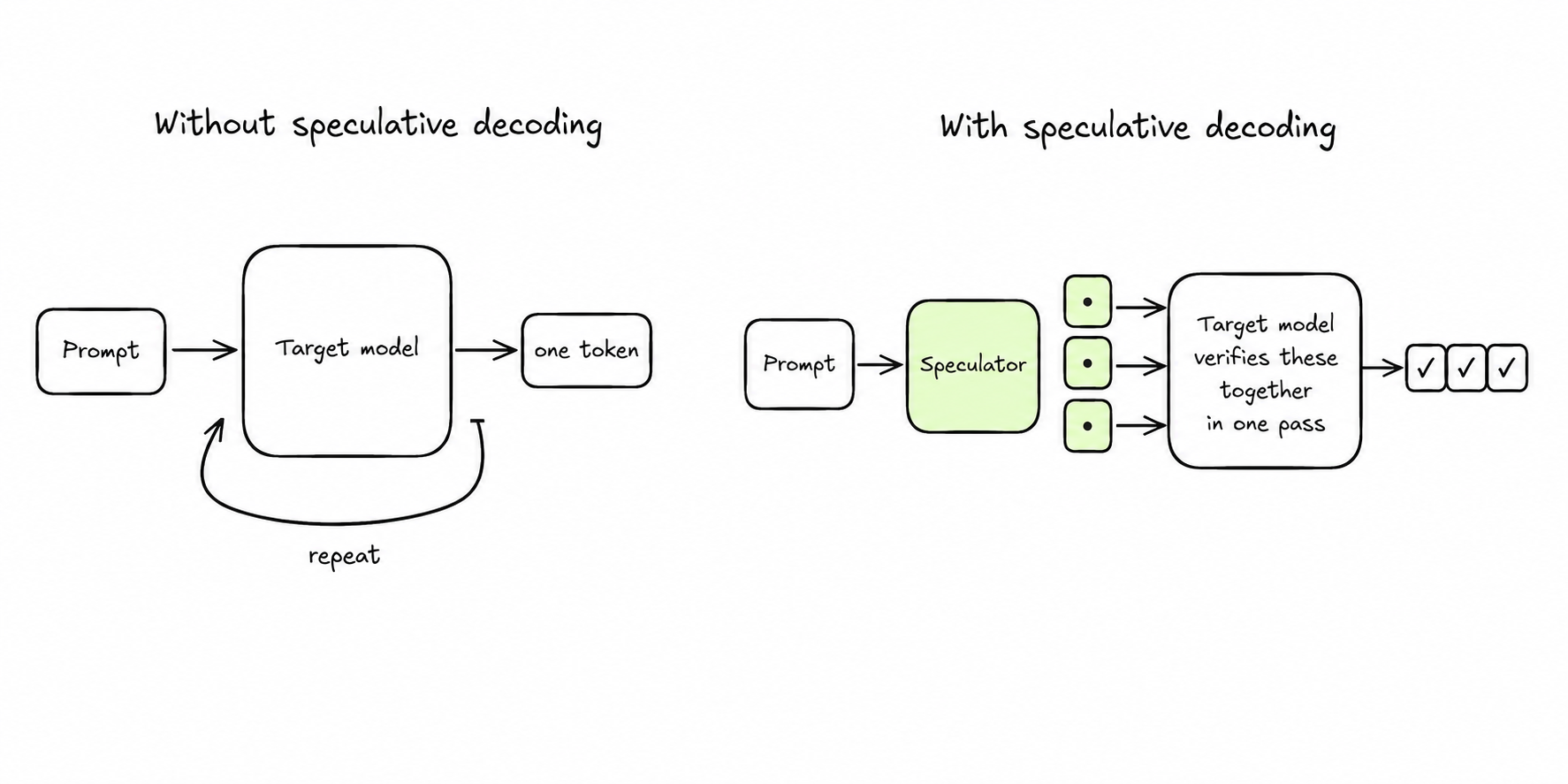
- A lightweight proposer drafts several likely future tokens.
- The target model verifies the draft in one batched forward pass.
- The runtime accepts the valid prefix and discards candidates after the first rejection.
- Generation continues from the last accepted token.
If three candidates are accepted, one target model pass advances the response by three tokens instead of one. The key metric is the mean accepted length, which tells you how many tokens each verification step adds on average.
Why speculative decoding matters on Jetson
Jetson systems often serve one or a few interactive sessions for a local agent, coding assistant, robot, or voice application. These low concurrency workloads are where decode is most likely to be memory bandwidth bound and where faster token generation is immediately noticeable. Speculative decoding makes each expensive read of the target model’s weights produce more useful output while adding only a small proposer beside the target model.
The different speculative decoding techniques
Jetson runtimes currently use three main learned speculative decoding techniques. Multi-Token Prediction, or MTP, uses prediction heads trained with the target model. DFlash uses a small target specific model to draft a block of tokens in parallel. DSpark builds on parallel drafting with correction and confidence mechanisms that can improve acceptance and avoid weak proposals. Each technique still relies on the target model to verify the final tokens.
| Technique | How it drafts | Checkpoint form | Recommended starting depth |
|---|---|---|---|
| MTP | Native future token prediction heads | Usually included in the target model | 3 |
| DFlash | A block diffusion drafter predicts a block in parallel | A companion trained for the target | 15 |
| DSpark | Parallel drafting with correction and confidence heads | A companion or fused checkpoint | 4 |
Speculative support is specific to the exact model variant. Start with the target model you want to run, then choose an MTP, DFlash, or DSpark checkpoint whose model card names that target. A draft built for a different size or architecture is not interchangeable. Quantized target models are generally supported, but quantization can affect acceptance rate, so benchmark the exact target and speculator pairing you plan to deploy.
Good places to find supported models are the target model card, the Jetson AI Lab model catalog, the Red Hat AI Speculator Models collection, and the DeepSpec released checkpoints.
Multi-Token Prediction (MTP)
MTP adds auxiliary prediction heads or layers during model training. These heads use the target model’s hidden state to predict several future tokens, then the full target model verifies them. The MTP weights usually come inside the target checkpoint, so one model repository contains everything needed for speculation. Qwen NVFP4 checkpoints are an example of this packaging.
There are exceptions. Gemma 4 publishes its MTP weights as a separate assistant checkpoint. To use Gemma 4 E2B, serve Google’s W4A16 QAT target checkpoint and provide the matching E2B assistant in the speculative configuration.
Look for MTP, NextN, or multi-token prediction in the model card. For GGUF models, make sure the publisher says that the conversion includes the MTP weights.
For native MTP, serve the Qwen NVFP4 checkpoint and enable the MTP method:
vllm serve nvidia/Qwen3.6-27B-NVFP4 \
  --max-model-len 8192 \
  --speculative-config '{
    "method": "mtp",
    "num_speculative_tokens": 3
  }'
The "method": "mtp" setting enables MTP. The "num_speculative_tokens": 3 setting asks MTP to draft up to three future tokens before each target model verification step.
Gemma 4 E2B uses a separate assistant. This example pairs Google’s W4A16 QAT target with the matching E2B assistant checkpoint:
vllm serve google/gemma-4-E2B-it-qat-w4a16-ct \
  --max-model-len 8192 \
  --speculative-config '{
    "method": "mtp",
    "model": "google/gemma-4-E2B-it-assistant",
    "num_speculative_tokens": 3
  }'
The model setting is required here because the MTP assistant is not included in the W4A16 QAT target checkpoint. The target and assistant must use the same Gemma 4 E2B model variant.
With a GGUF that contains supported MTP weights, llama.cpp reads the proposer from the same file. No separate -md argument is needed.
llama-server \
  -hf unsloth/Qwen3.8-27B-GGUF:Q4_K_M \
  -ngl all \
  -fa on \
  --spec-type draft-mtp \
  --spec-draft-n-max 3 \
  --host 0.0.0.0 \
  --port 8080
The --spec-type draft-mtp flag enables the MTP path. The --spec-draft-n-max 3 flag asks llama.cpp to draft up to three future tokens per verification step.
This is the configuration we used with Qwen3.8 27B on Jetson AGX Thor. With MTP depth 3, decode throughput increased from roughly 13 tokens/s to 35 tokens/s.
Start at 3, then test nearby values on representative prompts. A higher depth is not automatically faster because rejected tokens still consume draft and verification work. The checkpoint also needs enough MTP heads to support the requested depth.
DFlash
DFlash uses a small target specific block diffusion draft model. It starts with a masked block and predicts the draft positions in parallel while conditioning on hidden states from the target model. DFlash is extremely popular and currently has the broadest checkpoint ecosystem of the learned parallel drafting methods covered here, with published companions for many model families, sizes, and runtimes.
Representative pairings include:
| Target model | DFlash checkpoint | Engine |
|---|---|---|
Qwen/Qwen3-4B | z-lab/Qwen3-4B-DFlash-b16 | vLLM or converted GGUF |
nvidia/Qwen3-8B-NVFP4 | RedHatAI/Qwen3-8B-speculator.dflash | vLLM |
Qwen/Qwen3-30B-A3B | RedHatAI/Qwen3-30B-A3B-speculator.dflash | vLLM |
| Nemotron 3.5 Lightning 30B-A3B GGUF | apolo13x/NVIDIA-Nemotron-3.5-Lightning-30B-A3B-DFlash-GGUF | llama.cpp |
| Muse Glimmer 30B GGUF | dflash-kquant.gguf in meta-models/Muse-Glimmer-30B-GGUF | llama.cpp |
Pass the matched DFlash checkpoint in the speculative configuration:
vllm serve nvidia/Qwen3-8B-NVFP4 \
  --max-model-len 16384 \
  --speculative-config '{
    "method": "dflash",
    "model": "RedHatAI/Qwen3-8B-speculator.dflash",
    "num_speculative_tokens": 15
  }'
The "method": "dflash" setting selects the DFlash decoding path. The model setting selects the companion trained for the same Qwen3 8B model variant. The target in this example is the NVFP4 quantized checkpoint. The "num_speculative_tokens": 15 setting allows a draft block of up to 15 candidate tokens.
If the publisher provides compatible GGUF files, pass the target with -hf and the DFlash companion with -hfd:
llama-server \
  -hf ggml-org/NVIDIA-Nemotron-3.5-Lightning-30B-A3B-GGUF:Q4_K_M \
  -hfd apolo13x/NVIDIA-Nemotron-3.5-Lightning-30B-A3B-DFlash-GGUF \
  --spec-type draft-dflash \
  --spec-draft-n-max 15 \
  -ngl all \
  -ngld all \
  -fa on \
  --host 0.0.0.0 \
  --port 8080
The -hfd flag supplies the matched draft checkpoint. The --spec-type draft-dflash flag enables the DFlash path. The --spec-draft-n-max 15 flag sets the maximum draft block to 15 tokens. The -ngld all flag places all draft model layers on the GPU.
Start with 15 speculative tokens for a block size 16 checkpoint. One position is the known anchor token and the next 15 positions are proposals. DFlash does not generate those 15 tokens one after another. It predicts the block in parallel in one draft forward pass, so a 15 token block can have nearly the same drafting latency as a much smaller block.
The target model still has to verify the candidates, so total verification cost grows with the draft size. Start at 15, then test lower values. A smaller value can win when acceptance is low, the target is compute bound, or parallel verification activates extra experts in an MoE model.
DSpark
DSpark is a newer parallel drafting technique built on a DFlash style backbone. It adds a lightweight correction mechanism that carries information between positions and a confidence head that can stop weak drafts before they reach the target model. Its checkpoint ecosystem is still catching up with DFlash, but it is growing quickly. When both are well matched and tuned, DSpark is often slightly faster.
Examples of published DSpark checkpoints include:
| Target model | DSpark checkpoint |
|---|---|
| NVIDIA Nemotron 3.5 Lightning 30B-A3B NVFP4 | nvidia/NVIDIA-Nemotron-3.5-Lightning-30B-A3B-NVFP4-DSpark |
| Google Gemma 4 31B IT | RedHatAI/gemma-4-31B-it-speculator.dspark |
| Qwen3.6 35B-A3B | RedHatAI/Qwen3.6-35B-A3B-speculator.dspark |
This Jetson tested pairing uses Nemotron 3.5 Lightning and its dedicated DSpark checkpoint:
vllm serve nvidia/NVIDIA-Nemotron-3.5-Lightning-30B-A3B-NVFP4 \
  --trust-remote-code \
  --speculative-config '{
    "method": "dspark",
    "model": "nvidia/NVIDIA-Nemotron-3.5-Lightning-30B-A3B-NVFP4-DSpark",
    "num_speculative_tokens": 4
  }'
The "method": "dspark" setting enables the DSpark path. The model setting selects the companion trained for Nemotron 3.5 Lightning. The "num_speculative_tokens": 4 setting asks DSpark to draft up to four tokens per verification step.
In our Jetson testing, Nemotron 3.5 Lightning reached 115 tokens/s with DSpark depth 4. Start at 4, then test nearby values because the fastest depth depends on the model, workload, and hardware.
Nemotron also needs model specific reasoning, tool calling, Mamba, KV cache, and memory options for the best Jetson configuration. Copy the complete Thor or Orin command from the Nemotron 3.5 Lightning model page and use the DSpark settings shown above.
llama.cpp does not support DSpark yet. Do not pass a DSpark checkpoint through the DFlash path because the two architectures and decoding paths are different. Use vLLM for DSpark on Jetson for now, or choose a DFlash GGUF checkpoint when llama.cpp is required.
Tips for getting the most from speculative decoding
-
Tune the speculative depth for your workload. The recommended depths in this tutorial are starting points, not universal best values. The right depth depends on the model, prompt domain, output style, sampling behavior, concurrency, and hardware. Trial and error on a representative workload is the reliable way to find the fastest setting for your use case.
-
Compare against a clean baseline. It is recommended that you run the target with speculative decoding disabled, then repeat the same request set at several depths around the recommendation. Keeping the target checkpoint, context length, sampling settings, concurrency, Jetson power mode, and clocks unchanged makes the comparison reliable. Useful metrics include output throughput, inter token latency, time to first token, end to end latency, acceptance rate, and peak memory use.
-
Keep the model builder’s sampling settings. It is not recommended to change the sampling parameters to improve acceptance or make speculative decoding look faster. The model builder’s recommended temperature, top p, top k, repetition settings, reasoning mode, and chat template are the best settings to use. They are either the checkpoint defaults or documented in the model card. These settings are chosen for the model’s accuracy and are usually the ones used for the builder’s evaluations. Using the same sampling settings for the baseline and every speculative run keeps the comparison consistent.
Benchmarking with SPEED-Bench and AIPerf
If you already have prompts from your application, benchmark with those first. If you do not have a representative dataset, use SPEED-Bench. SPEED-Bench stands for SPEculative Evaluation Dataset. Its qualitative split contains 880 prompts across 11 categories, with 80 prompts in each category. The categories cover coding, humanities, math, multilingual tasks, question answering, retrieval augmented generation, reasoning, roleplay, STEM, summarization, and writing.
The recommended runner is AIPerf. It can replay SPEED-Bench against an OpenAI compatible server while controlling request count, concurrency, and output sequence length. It also collects server side speculative decoding metrics.
Install AIPerf and prepare SPEED-Bench:
python3 -m venv aiperf-venv
source aiperf-venv/bin/activate
pip install "aiperf==0.11.0"

export SPEED_BENCH_DIR="./datasets/speed-bench"
curl -LsSf https://raw.githubusercontent.com/NVIDIA-NeMo/Skills/refs/heads/main/nemo_skills/dataset/speed-bench/prepare.py | python3 - --config qualitative --output_dir "$SPEED_BENCH_DIR"
Run all 880 qualitative prompts against a vLLM server on port 8000:
aiperf profile \
  --model nvidia/NVIDIA-Nemotron-3.5-Lightning-30B-A3B-NVFP4 \
  --endpoint-type chat \
  --streaming \
  --url http://localhost:8000 \
  --custom-dataset-type speed_bench_qualitative \
  --input-file "$SPEED_BENCH_DIR/qualitative.jsonl" \
  --server-metrics http://localhost:8000/metrics \
  --num-conversations 880 \
  --osl 4096 \
  --concurrency 1 \
  --output-artifact-dir ./artifacts/speed-bench-all
The --num-conversations 880 flag runs every qualitative conversation once. This matters because some SPEED-Bench samples contain multiple turns. The --osl 4096 flag sets the maximum output sequence length to 4096 tokens. The model can still stop naturally before reaching that limit. The --concurrency 1 flag sends one request at a time, which matches an interactive edge workload. Keep these three values fixed while comparing speculative depths.
The command does not override temperature, top p, top k, or other sampling parameters. The server continues to use the model builder’s defaults. If the model card requires explicit sampling settings, configure them identically for every server run.
Benchmark the categories that match your use case
The full SPEED-Bench run gives a broad comparison, but your application may depend on only one part of the dataset. For example, a writing assistant should also be tested on the writing category by itself. Pin the number of requests, output sequence length, and concurrency so every speculative depth receives the same work.
The available categories are:
- Coding
- Humanities
- Math
- Multilingual
- Question answering
- Retrieval augmented generation
- Reasoning
- Roleplay
- STEM
- Summarization
- Writing
Choose the category that most closely matches your application. In AIPerf, set --custom-dataset-type to speed_bench_<category>. For example, use speed_bench_writing for writing or speed_bench_coding for coding. Every category contains 80 conversations in the same qualitative.jsonl input file.
aiperf profile \
  --model nvidia/NVIDIA-Nemotron-3.5-Lightning-30B-A3B-NVFP4 \
  --endpoint-type chat \
  --streaming \
  --url http://localhost:8000 \
  --custom-dataset-type speed_bench_writing \
  --input-file "$SPEED_BENCH_DIR/qualitative.jsonl" \
  --server-metrics http://localhost:8000/metrics \
  --num-conversations 80 \
  --osl 4096 \
  --concurrency 1 \
  --output-artifact-dir ./artifacts/speed-bench-writing
The writing split contains 80 conversations, so --num-conversations 80 runs the category once. Change speed_bench_writing to another category such as speed_bench_coding or speed_bench_reasoning when that better represents your application.
If you want to pin an exact number of HTTP requests instead of running each conversation once, replace --num-conversations 80 with a request count. The following setting sends exactly 200 requests. AIPerf can reuse conversations to reach that number.
--request-count 200Compare the results
Save each speculative depth to a separate artifact directory. After the runs finish, create a throughput report:
aiperf speed-bench-report ./artifacts --metric throughput --format bothCompare the baseline with MTP depths around 3, DFlash depths at and below 15, or DSpark depths around 4. Choose the setting that gives the best decode throughput and inter token latency without increasing end to end latency or memory use beyond what your application can accept.
Conclusion
Speculative decoding is one of the easiest performance wins available for memory bound LLM decode on Jetson. It is lossless, it usually adds only modest memory overhead, and it can multiply decode throughput when the technique and depth fit the model. Start with MTP at 3 when native MTP is available, DFlash at 15 when a matched DFlash checkpoint exists, or DSpark at 4 in vLLM when the publisher provides a validated pairing. Then use SPEED-Bench or your own prompt set to tune the depth on your exact workload.
DFlash currently offers the widest checkpoint selection and works in both vLLM and llama.cpp. DSpark is newer, often slightly faster when well tuned, and does not yet work in llama.cpp. Whichever technique you choose, keep the model builder’s sampling parameters unchanged and compare it against the same non speculative baseline.